
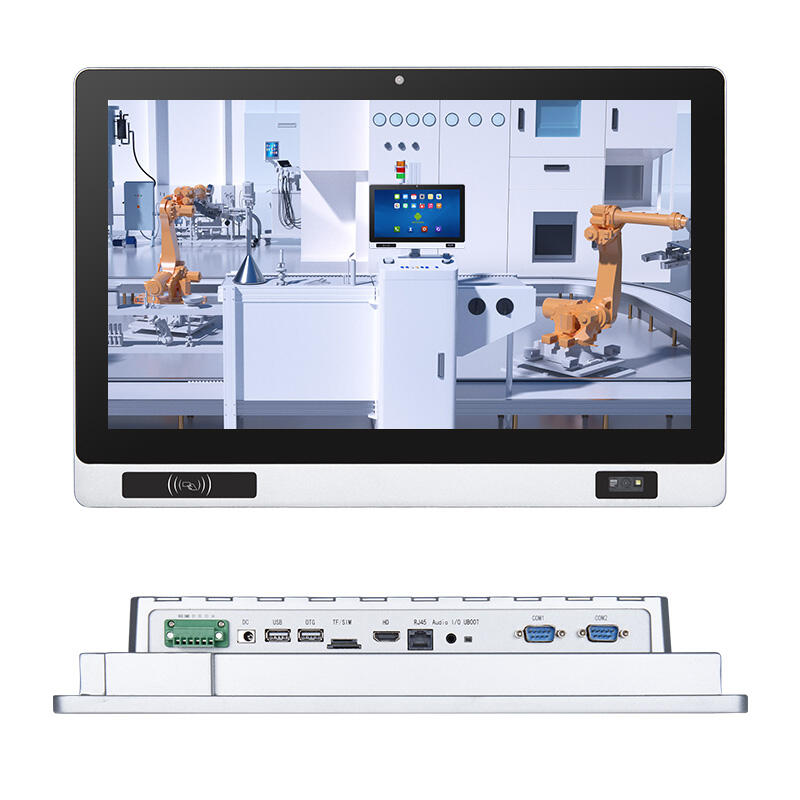
Processor Performance: Power, Thermal Management, and Long-Term Reliability for Panel PC Industrial Use
High-Performance vs. Low-Power CPU Tradeoffs in Mission-Critical Panel PC Industrial Environments
When choosing processors for industrial panel computers, manufacturers need to find the sweet spot between computing muscle, heat generation, and how well these components hold up over years of operation. The top tier CPUs from Intel like Core i7 and i9 series handle tough jobs such as running AI vision systems or managing complex motion controls in factories. However, these powerful chips typically run hot with thermal design power ratings around 45 watts, which means they require some kind of active cooling system. But wait - what happens when these machines are deployed in places where dust is everywhere and vibrations shake things constantly? Fans used for cooling become potential weak spots that can break down and create extra work for maintenance crews. That's why many companies turn to lower power options instead. Processors based on ARM architecture along with Intel's Atom and Celeron lines generate less than 15 watts of heat, making them perfect candidates for fanless designs that can be completely sealed against contaminants. These compact solutions work great in sterile environments like pharmaceutical labs or dangerous areas where sparks could be problematic. Of course there's always a tradeoff involved here too. While these energy efficient chips save space and reduce failure risks, they might not keep up with data intensive applications that demand fast processing speeds and minimal delays.
In mission-critical operations where downtime averages $740,000 per incident (Ponemon Institute, 2023), the optimal choice hinges not on peak specs, but on deterministic performance aligned with application requirements:
| Performance Factor | High-Performance CPU | Low-Power CPU |
|---|---|---|
| Thermal Output | High (requires fans) | Minimal (fanless viable) |
| Power Consumption | 35–45W | 5–15W |
| Use Case Fit | AI vision systems, complex HMI logic | Basic SCADA HMIs, status monitoring |
| Failure Risk | Fan/motor degradation, dust ingress | Thermal throttling under sustained load |
Pharmaceutical cleanrooms, for instance, favor low-power processors to eliminate particulate risk from cooling fans–while metal stamping lines prioritize high-clock-speed determinism for sub-millisecond I/O synchronization, accepting added thermal management complexity.
Fanless Thermal Design Constraints and Their Impact on Processor Selection
When systems run without fans, there are real limitations on what kind of processors can be used because they have to rely only on conduction for cooling. The heat has to move through heatsinks, those special thermal compounds between components, and the metal case itself. No forced air means most industrial setups can handle around 15 watts of thermal design power before things get too hot. But this number goes down even more when temperatures outside the enclosure rise. These restrictions basically rule out many fast x86 chips that generate lots of heat. Instead, manufacturers look for processors designed specifically for low power consumption. They often select chips that have been tested (binned) to work at lower voltages and include features like power gating that shut off parts of the chip when not needed.
Effective fanless design requires:
- Ambient operating range validation across -20°C to 60°C (IEC 60068-2-14 compliant testing)
- Metallic enclosures with high thermal conductivity and optimized surface-area-to-volume ratios
- Advanced thermal interfaces–such as graphite pads, vapor chambers, or graphene-enhanced composites–for hotspot mitigation
- 72-hour continuous load validation to confirm stability under worst-case thermal cycling
When working in environments like foundries or offshore platforms where temperatures regularly climb above 50 degrees Celsius, even low power 10 watt processors can start throttling back performance unless they're paired with copper alloy heatsinks and properly applied phase change materials. That explains why about 78 percent of fanless industrial panel computers currently on the market rely on Intel Atom chips or ARM Cortex A series processors. It's not just about brand loyalty either these components work better in such conditions since their thermal characteristics and ability to adjust voltage levels match what passive cooling systems need while also standing up to vibrations. We've seen data showing that mechanical components cut down on mean time between failures by around 40 percent in areas with constant shaking according to a study from Rigorous Research last year. Getting rid of those moving parts isn't just good practice it's actually one of the most important decisions for ensuring reliable operation over time.
Display & Touch Interface: Sunlight Readability, Glove Compatibility, and Durability for Panel PC Industrial Applications
Projected Capacitive vs. Resistive Touch Under Harsh Conditions (Wet, Gloved, Vibration)
The choice of touch interface makes a big difference when it comes to how efficient operators are and how much time systems stay online in tough industrial environments. Resistive screens work well under pressure situations where workers need to input data while wearing gloves, using styluses, or even with wet fingers. That's why these screens have become so common in places like food plants, chemical labs, and factories dealing with heavy machinery. On the downside though, resistive technology has this layered design that actually cuts down on screen clarity compared to other options. Plus, they don't support multi-touch gestures out of the box which can be frustrating for some applications. Operators often mention this limitation during training sessions as something that takes getting used to.
PCAP displays definitely have their perks when it comes to picture quality, supporting multiple touch points at once, and responding quickly to inputs. The catch? They need direct skin contact or those special conductive gloves to work properly. Problems pop up when there's moisture around, condensation builds up, or vibrations interfere since these conditions often cause random touches or areas that just stop working altogether. This makes them tricky for real world use in places where things get messy or shaky. When looking at situations where both tough construction and touch capabilities matter, like on handheld devices used in field service or industrial tablets, hybrid firmware approaches come into play. These include features like noise filtering that adapts to changing conditions and settings that adjust how sensitive the screen is to gloved fingers. Still, if the environment is really unpredictable with lots of variables outside our control, going old school with resistive technology at the hardware level tends to be the safest bet for reliability.
Optical Bonding and High-Nit Displays for Reliable Visibility in Bright or Variable Lighting
Standard industrial displays (~300 nits) quickly become illegible under direct sunlight or intense factory lighting, risking operational delays or misreadings. High-nit panels (700+ nits) deliver sufficient luminance to maintain contrast and readability in full daylight–critical for outdoor logistics terminals, solar farm controls, or sunlit production lines.
Optical bonding basically means sticking display glass directly to the LCD layer with clear adhesive. This gets rid of the annoying air gap between layers that creates those pesky reflections and foggy spots when temperatures change. The result? Displays become much clearer to look at. Studies show these bonded displays cut down on glare problems by around 400 percent compared to regular displays without bonding. Plus, they tend to last longer because there's less strain on the backlight parts from constant changes in brightness levels. Manufacturers love this for outdoor applications where visibility matters most.
For 24/7 utility monitoring or rail signaling applications, high-nit + optically bonded displays ensure consistent legibility across dawn-to-dusk lighting transitions–without requiring manual brightness adjustments or external hoods.
Environmental Ruggedness: IP/NEMA Ratings, Operating Temperature, and Mechanical Resilience for Panel PC Industrial Deployment
Beyond IP65: Corrosion Resistance, Sealing Integrity, and NEMA 4X Validation for Harsh Environments
The IP65 rating offers good defense against dust getting inside and protects from water jets, though it doesn't hold up well when faced with harsh cleaning chemicals, salt air, or sudden temperature changes. Take food processing facilities for instance where workers regularly use strong acid-based cleaners and basic alkaline solutions. These substances eat away at regular aluminum or painted steel boxes much faster than expected. And then there's the ocean environment. Marine equipment needs something way better than IP65 since saltwater causes tiny pits in metal surfaces over time. Anyone working near the coast knows how quickly corrosion sets in without proper protection.
NEMA 4X certification builds upon IP65-equivalent sealing by mandating stainless steel construction (typically 316-grade), validated resistance to corrosion, and proven integrity across wide thermal cycles (-40°C to 85°C). This dual-layer defense ensures long-term sealing integrity–even after repeated high-pressure washdowns or exposure to aggressive vapors.
| Protection Level | Key Features | Ideal Environments |
|---|---|---|
| IP65 | Dust-tight, water jet resistance | General factory floors |
| NEMA 4X | IP65 + corrosion resistance, thermal resilience (-40°C to 85°C) | Food processing, chemical plants, marine settings |
| IP69K | High-pressure/high-temperature washdown protection | Pharmaceutical cleanrooms, heavy equipment wash bays |
Selecting beyond baseline ratings isn’t optional in extreme conditions: Industrial Automation Report (2023) found that panel PCs rated to NEMA 4X or IP69K experienced 34% fewer field failures over five-year deployments–primarily by preventing micro-ingress that leads to electrical shorts during thermal expansion cycles.
I/O Flexibility and Future-Proof Connectivity for Panel PC Industrial Integration
Balancing Legacy Support (RS-232/485, CAN Bus) with Modern Needs (Wi-Fi 6, Bluetooth 5.2)
Industrial panel PCs act as the bridge between old school factory equipment and today's cutting edge data systems. They need to work with those ancient machines still using RS-232, RS-485, or CAN bus connections so they can talk to PLCs, motor controllers, and those analog sensors without breaking the bank on expensive gateway upgrades. And don't forget about the newer stuff too! Modern wireless tech like Wi-Fi 6 (which can handle speeds around 9.6 Gbps when everything lines up just right) and Bluetooth 5.2 (with better mesh networks and those energy saving beacons) makes it possible to spread out IoT sensors across facilities, push software updates remotely, and even diagnose problems from a smartphone or tablet instead of crawling through dusty machine rooms.
The expandable input/output architecture with PCIe and Mini PCIe slots helps protect against outdated protocols and keeps up with growing bandwidth needs over time. Take this scenario: one panel computer can run both an old-school RS-485 module for controlling conveyor belts and a modern Wi-Fi 6 module for displaying real time production efficiency metrics at the same time. According to industry research from 2023, this kind of setup cuts down on integration expenses by around 30%. By combining different connection methods like this, companies save money on their initial investments and speed up their move toward digital operations even when working with equipment of varying ages and capabilities.
Frequently Asked Questions
What is the difference between high-performance and low-power CPUs in industrial panel PCs?
High-performance CPUs like Intel's Core i7 and i9 offer strong processing capabilities suitable for complex applications such as AI vision systems. However, they produce more heat and may require active cooling systems, which can lead to maintenance challenges in harsh environments. Low-power CPUs, including Intel's Atom and ARM processors, generate less heat and can be used in fanless designs, making them ideal for contaminant-sensitive settings.
Why is fanless thermal design important in industrial applications?
Fanless thermal design is crucial to prevent the accumulation of dust and debris in the cooling fans, which can lead to system breakdowns in industrial settings. This design relies on passive cooling methods like heatsinks and metallic enclosures to maintain temperature efficiency, ensuring long-term reliability in environments prone to vibrations and other physical disturbances.
How does optical bonding improve display clarity?
Optical bonding eliminates the air gap between the LCD layer and display glass, reducing reflections and foggy spots caused by temperature changes. This enhances display clarity and reduces glare, making it ideal for outdoor applications where visibility is critical.
What are the advantages of high-nit displays in industrial panel PCs?
High-nit displays, typically offering 700+ nits, enable clear visibility even in bright sunlight or intense lighting conditions. This is essential for operations in outdoor settings or environments with variable lighting, reducing the risks of operational delays.
Why are IP/NEMA ratings important for industrial panel PCs?
IP/NEMA ratings provide benchmarks for dust, water, and corrosion resistance crucial in harsh environments. For example, NEMA 4X ensures that the panel PCs have corrosion and thermal resilience, which is vital in food processing or marine settings, leading to fewer field failures.
Table of Contents
- Processor Performance: Power, Thermal Management, and Long-Term Reliability for Panel PC Industrial Use
- Display & Touch Interface: Sunlight Readability, Glove Compatibility, and Durability for Panel PC Industrial Applications
- Environmental Ruggedness: IP/NEMA Ratings, Operating Temperature, and Mechanical Resilience for Panel PC Industrial Deployment
- I/O Flexibility and Future-Proof Connectivity for Panel PC Industrial Integration
-
Frequently Asked Questions
- What is the difference between high-performance and low-power CPUs in industrial panel PCs?
- Why is fanless thermal design important in industrial applications?
- How does optical bonding improve display clarity?
- What are the advantages of high-nit displays in industrial panel PCs?
- Why are IP/NEMA ratings important for industrial panel PCs?