
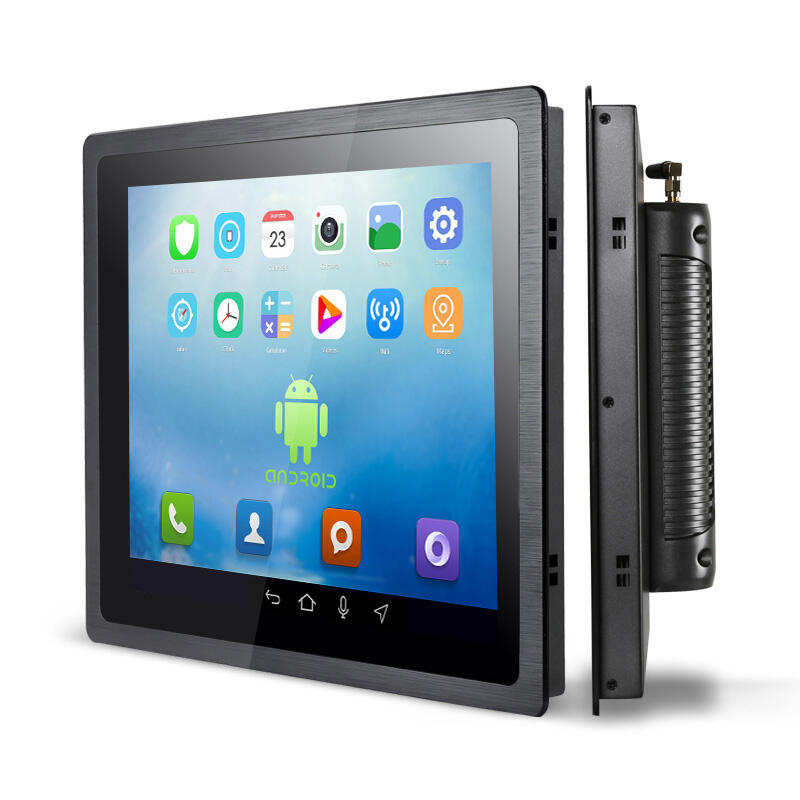
Why Industrial Touchscreen Panel PC Screens Demand Specialized Cleaning
Industrial environments expose touchscreens to contaminants rarely found in commercial settings. Manufacturing floors generate particulate matter at 15–20 times higher concentrations than office spaces—creating unique cleaning challenges for panel PCs.
Unique Contaminants: Oils, Coolants, Metal Shavings, and Dust in Harsh Environments
Metal shavings left behind during machining work their way into touchscreens and cause false readings, while leftover coolant tends to create gooey films that make screens less responsive after just a few weeks of use. Oily stuff gets into tiny cracks and crevices on the screen surface, which can lead to permanent cloudiness unless cleaned properly with the right products. Industrial touchscreen computers deal with this problem differently than regular consumer gadgets. They accumulate layers of grime over time as dust mixes with machine oil and coolant residue. Cleaning these requires special chemicals designed to break down all those stuck-on materials without damaging the screen's anti-glare finish or messing up the sensitive capacitive sensors underneath.
How IP64/IP65 Ratings Influence Safe Access and Cleaning Constraints
Sealed enclosures delivering IP64/IP65 dust- and water-resistance impose strict cleaning limitations. Improper techniques risk:
- Chemical degradation of gaskets
- Liquid ingress through ports or seams
- Weakening of adhesive seals, reducing impact resistance
High-pressure sprays (>15 PSI) and immersion methods exceed certification testing parameters and must be avoided. Instead, surface-wiping protocols must align with the manufacturer’s validated ingress protection methodology—preserving the environmental sealing that defines industrial-grade reliability.
By addressing these distinct challenges, specialized cleaning prevents premature touchscreen replacement costs averaging $740,000 annually for manufacturing facilities (Ponemon Institute, 2023) while sustaining operational continuity.
Step-by-Step Safe Cleaning Protocol for Industrial Touchscreen Panel PC Screens
Power Down, Isolate, and Prepare: Critical First Steps Before Contact
First things first, turn off the unit completely and unplug everything to stay safe from shocks and avoid any short circuits happening. Lock it out properly too so nobody accidentally turns it back on while we're working. Now grab what we need: standard 70% rubbing alcohol works great for cleaning, some soft microfiber cloths (the kind that don't leave behind fibers), and definitely wear those rubber gloves to protect hands during the process. Good lighting is essential here because sometimes tiny bits of metal or leftover coolant can hide in corners. Take a close look at all the connection points as well. Check if any seals are damaged or worn out since maintaining proper protection ratings (like IP64 or IP65) depends on keeping those parts in good shape.
The Correct Sequence: Mist (Not Spray), Wipe with Microfiber, Dry Thoroughly, Verify Responsiveness
Follow this precise sequence:
- Mist the cloth—lightly dampen (never saturate) a microfiber cloth with 70% isopropyl alcohol. Never spray liquid directly onto the screen, as it may breach seals.
- Wipe gently—use minimal pressure and circular motions to lift contaminants; avoid horizontal or vertical scrubbing, which spreads particles across the surface.
- Dry immediately—buff with a dry section of microfiber to remove streaks and residual moisture, which attracts dust and compromises clarity.
- Verify functionality—after reassembly, test calibration accuracy by touching all four quadrants and confirm responsiveness using built-in diagnostic software.
This protocol safeguards the touch interface and minimizes unplanned downtime. Deviations increase risks of calibration drift, sensor degradation, and shortened service life.
Approved vs. Prohibited Materials for Industrial Touchscreen Panel PC Screen Maintenance
Gold-Standard Solutions: 70% Isopropyl Alcohol and Lint-Free Microfiber for Resistive & Capacitive Screens
When it comes to keeping those industrial touchscreen panel PCs clean, most experts still point to 70% isopropyl alcohol and good quality microfiber cloths as the go-to method. The combo works great for cutting through all sorts of grime including machine oils, coolant residues, and metal dust without messing up those delicate screen coatings. What makes this approach so effective? Well, the alcohol evaporates just right - fast enough to get rid of dirt but slow enough not to leave water sitting around where it could damage components. Plus, microfiber doesn't scratch either type of screen surface, resistive or capacitive. And interestingly enough, studies indicate that regular cleaning with these materials can actually make touchscreens last about 40% longer than ones left dirty and neglected.
Harmful Substances to Avoid: Bleach, Ammonia, Abrasives, Paper Towels, and >70% Alcohol
Common household cleaners like bleach, ammonia, and those abrasive stuff people think works wonders on screens actually do more harm than good. Paper towels scratch surfaces too, especially when combined with anything over 70% alcohol concentration. What happens? The fancy anti-glare coatings wear away, tiny scratches start appearing that mess up touch response, and worst of all there's this static electricity buildup that can fry capacitive sensors right through the glass. One major display company looked at their warranty claims and found out something shocking: nearly four out of five early touchscreen failures in manufacturing plants came down to bad cleaning practices. Their tech support team gets calls about this all the time from frustrated plant managers who didn't realize what they were doing was causing thousands in replacement costs.
Compliance, Safety, and Long-Term Screen Integrity
Following proper compliance and safety rules keeps operations running smoothly while safeguarding workers and preserving screens over time. Check if equipment has those important certifications like CE, FCC, or UL marks on them. These labels basically confirm things work safely electrically, resist interference from other electronics, and can handle tough environments. Don't risk using random cleaners not approved by the maker or skipping their suggested procedures. Doing so often leads to permanent damage to protective coatings and gradual loss of how responsive the touch screen remains. Field reports show around one third of early screen failures happen because people neglect regular maintenance when working in really demanding industrial settings where dust and moisture are constant problems.
Key safeguards for sustained performance include:
- Annual certification audits to verify alignment with current safety and environmental standards
- Strict chemical compatibility adherence, using only manufacturer-approved cleaners
- Detailed usage documentation, logging cleaning frequency, observed residue types, and corrective actions
- Quarterly preventive inspections, assessing seal integrity, touch responsiveness, and visible surface wear
This proactive, standards-aligned approach reduces unplanned downtime by 40% and significantly extends display service life—supporting both operational continuity and long-term ROI.
FAQ
What are the common contaminants in industrial touchscreen environments?
Industrial touchscreens typically encounter oils, coolants, metal shavings, and dust, which can cause various problems if not cleaned regularly and properly.
What precautions should be taken before cleaning industrial touchscreens?
Ensure the unit is powered down completely and unplugged. Use standard 70% rubbing alcohol and soft microfiber cloths for effective cleaning, and wear protective gloves.
What substances are harmful to touchscreen panels?
Avoid using bleach, ammonia, abrasives, paper towels, and alcohol concentrations higher than 70%, as these can damage the screen's surface and components.
Why is following compliance and safety rules important for touchscreen maintenance?
Adhering to compliance and safety standards ensures operational efficiency, worker safety, and long-term screen durability, preventing costly repairs and replacements.