
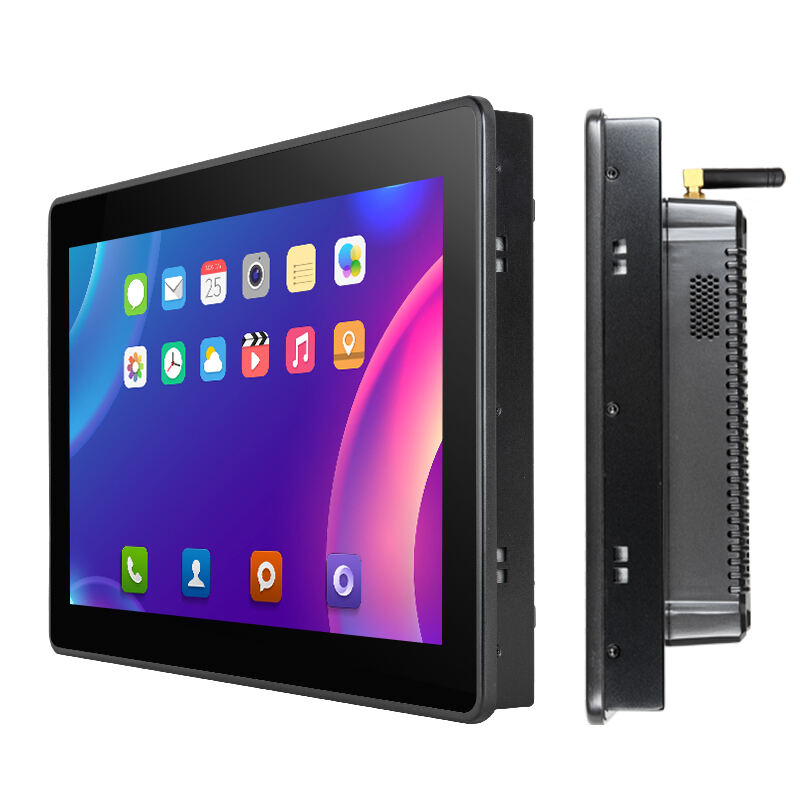
Standard Industrial Touchscreen Panel PC Screen Sizes and Technical Constraints
Mechanical and Thermal Limits Defining Common Size Ranges (10.4" to 21.5")
The physical dimensions of industrial touchscreen panel PCs typically run from around 10.4 inches up to about 21.5 inches because manufacturers have to strike a balance between how tough they need to be and how hot they get during operation. Smaller displays below 15 inches often come with extra strong frames and housing since they face all sorts of vibrations on factory floors. Bigger screens above 18 inches create different problems altogether. These larger panels tend to generate way more heat, so most fanless models rely on aluminum cases with built-in cooling fins to keep processors running safely even when installed in cramped spaces. The relationship between screen size and heat production isn't linear either. According to recent data from the Industrial Hardware Report, those big 21.5 inch panels actually produce roughly 40 percent more heat compared to their 15 inch counterparts. That's why materials matter so much here. Manufacturers spend a lot of time selecting special metal blends and glass types that won't warp or crack under temperature changes. No wonder then that nearly nine out of ten industrial panel computers currently in use across manufacturing plants worldwide stick to this 10.4 to 21.5 inch sweet spot where everything works reasonably well together.
Mounting, Enclosure, and IP Rating Impacts on Physical Dimensions
The enclosure specs really dictate how big those panels end up being, and honestly cut down on what people actually see. Take IP65 rated sealed boxes for instance they typically eat away at least 15 to 20 millimeters from each side compared to regular housing options. And when we talk about VESA compliant setups, there's this hard limit where depth can't go beyond 60mm. Swing arm mounting solutions create another problem because they require stronger corner reinforcement which ends up widening the bezel area by somewhere around 25 percent. So even if someone orders a 15 inch display, after all these additions and adjustments, the actual viewable space might drop to just 14.1 inches when using an IP66 setup. Conductive EMI gaskets are another factor here. These little shields that block interference actually take up more room on the screen itself, shrinking the visible area by about 12% in places with heavy shielding needs such as power stations or medical lab environments. All these compromises show why manufacturers need to focus more on the real world installation space rather than getting caught up in marketing sizes that don't reflect what customers actually get to see.
Industrial Touchscreen Panel PC Size Selection by Industry and Application
Automotive & Manufacturing: Why 15.6" and 19"
When it comes to automotive assembly lines and discrete manufacturing environments, most facilities stick with either 15.6 inch or 19 inch industrial panel computers. These aren't necessarily the biggest options available, but they work best for what manufacturers actually need on the floor. The smaller 15.6 inch models fit right into those tight spaces between machinery components and operator workstations. They handle glove touches just fine too, which matters when workers are wearing protective gear. Plus, these screens can take all that constant vibration from factory equipment without breaking down. Their brightness levels range from around 500 to 1000 nits, making them readable even under bright overhead lights while keeping heat generation manageable. For bigger tasks like quality inspection and monitoring human machine interfaces (HMIs), the 19 inch version is hard to beat. Operators often need to view multiple data sources at once anyway - think live video feeds next to engineering drawings or production efficiency metrics displayed side by side. According to recent industry reports from last year's automation benchmark study, companies that switched to these standard sizes saw about an 18% drop in input mistakes made by staff. That makes sense when considering how much clearer everything looks without having to constantly zoom in or scroll through menus.
Food, Pharma, and Cleanroom Environments: The 12.1"–18.5" Sweet Spot for Compliance and Usability
Industries where cleanliness matters most typically work within a tighter size window from around 12.1 inches up to 18.5 inches because they need to comply with strict sanitation rules, manage particulates, and follow regulations. The smaller 12.1 inch screens fit right into those special stainless steel enclosures rated IP69K that can handle intense pressure washing. Larger screens between 15 and 18.5 inches give enough space for checking batch records, navigating standard operating procedures, and keeping an eye on multiple parameters even when workers are wearing gloves. Many people in pharmaceutical cleanrooms have settled on 15 inch displays as their go-to option these days. These models don't have fans so there's no risk of spreading particles through air movement, plus their small size makes them easier to reach in tight spots like ISO Class 5 to 7 areas. According to the latest EHEDG Hygienic Design Guidelines from 2024, this particular size range works best for several reasons including how easy surfaces are to clean, controlling microbes by reducing gap sizes between components, and making sure everything stays ready for audits. That's why most facilities aiming for FDA 21 CFR Part 11 or EU GMP Annex 1 compliance tend to stick with these dimensions.
How Display Performance Factors Interact with Industrial Touchscreen Panel PC Size
Brightness, Power Efficiency, and Heat Dissipation Trade-offs Across Sizes
For outdoor kiosks needing to be readable in direct sunlight or on brightly lit factory floors, displays must hit at least 800 nits of brightness. But there's a catch: brighter screens mean higher power consumption and more heat generation. Take a look at screen sizes alone. A standard 21.5 inch display will typically consume around 30% more power compared to a smaller 15.6 inch version. This creates serious thermal management issues inside those sealed, fanless enclosures rated IP65+. The extra heat generated puts stress on internal components, causes backlights to degrade faster, and increases the risk of thermal throttling problems. Manufacturers dealing with these challenges often turn to three main approaches. First, they implement segmented LED backlight zones that can dim specific areas not in use. Second, many now rely on specialized low-power System-on-Chips designed specifically for fanless operation with built-in graphics capabilities. And finally, ambient light sensors help adjust screen brightness automatically based on surrounding conditions, cutting down both electricity usage and heat output while keeping text and images clearly visible even under harsh lighting conditions.
Bezel Design, Touch Accuracy, and Ergonomic Viewing Distance Considerations
The thickness of bezels affects more than just how a display looks - it actually impacts how well systems perform overall. Very thin bezels make great sense for creating those seamless video walls we see everywhere these days, but they can be problematic in environments where there's a lot of vibration going on because they don't hold up as well structurally. On the flip side, when manufacturers reinforce the bezel for better durability, this usually comes at a cost. The pixels get packed less tightly together, which means lower resolution per inch, plus there tends to be more empty space surrounding the actual viewing area. When it comes to touchscreens specifically, PCAP technology generally keeps things accurate within about 1mm regardless of screen size. However, bigger displays present their own challenges since designers need to scale user interfaces properly so buttons remain usable even when someone is wearing gloves or needs to operate quickly. Screen size choices also depend heavily on ergonomics factors. People need to sit at a comfortable distance from whatever they're looking at without straining their eyes or developing back problems from poor posture. Most industry professionals follow established standards like IEC 62366 and ISO 9241-300 when making these kinds of decisions, as shown in the table that follows.
| Screen Size | Minimum Viewing Distance | Maximum Viewing Distance |
|---|---|---|
| 10.4" | 16" (40 cm) | 28" (70 cm) |
| 19" | 30" (76 cm) | 47" (120 cm) |
| 21.5" | 34" (86 cm) | 55" (140 cm) |
Consistent 178° viewing angles and anti-glare matte finishes ensure uniform color and contrast across multi-operator workstations—even under overhead LED banks or direct sunlight through skylights.
FAQ
What are the common size ranges for industrial touchscreen panel PCs?
Industrial touchscreen panel PCs typically range from 10.4 inches to 21.5 inches.
Why is size selection important for industrial touchscreen panel PCs?
Size selection impacts thermal management, durability, compliance with standards, and usability in specific environments like cleanrooms and manufacturing facilities.
How does screen size affect power efficiency and heat management?
Larger screens consume more power and generate more heat, requiring considerations like segmented LED backlight zones and low-power SoCs for efficient thermal management.
Why are IP ratings important for industrial touchscreens?
IP ratings determine the level of protection against water and dust, which dictates enclosure design and impacts the overall physical dimensions and visibility of the screen.
What industries benefit most from specific screen sizes?
Automotive and manufacturing industries benefit from 15.6" and 19" screens, while food, pharma, and cleanroom environments prefer sizes between 12.1" to 18.5" for compliance and usability.